


Download Resonic – Music Player, Waveform, Audio Visualizer, FLAC, MP3, OGG, WAV
Overview
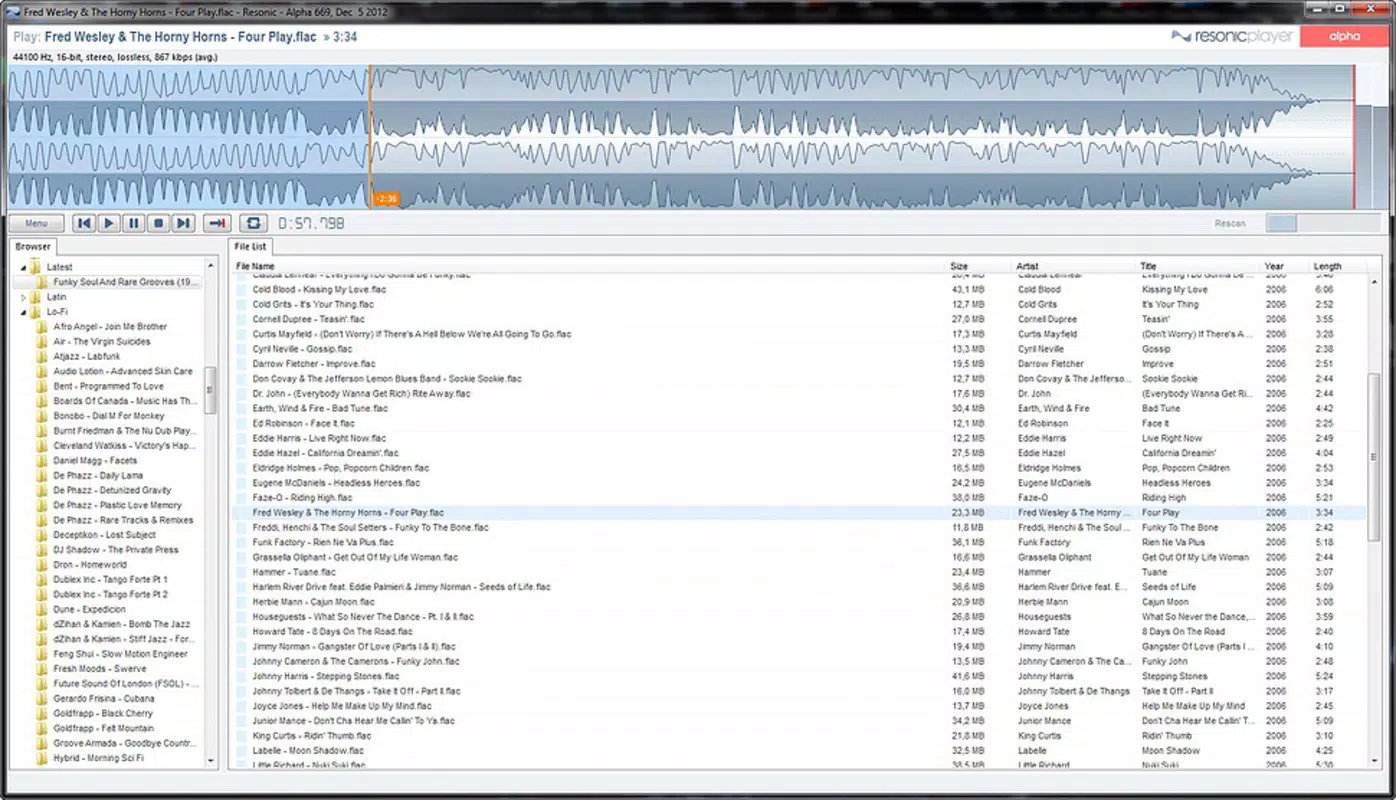
Resonic is a specialized music player designed to deliver a visually immersive and functionally robust listening experience. Tailored for both audiophiles and everyday music enthusiasts, the app emphasizes high-quality audio playback alongside real-time waveform visualization. Its core purpose is to transform music consumption into a dynamic, interactive experience by displaying full waveform representations for each track, allowing users to visually engage with audio dynamics as they play.
The app addresses common pain points such as limited visual feedback in standard players and the need for seamless compatibility across diverse audio formats. By integrating a built-in file explorer, Resonic enables users to access their entire music library without switching applications, streamlining navigation and playback. It is particularly beneficial for users managing large collections across multiple folders and formats.
The developer, Resonic, has positioned the app as a lightweight yet powerful tool within the music software ecosystem, offering a balance between aesthetic appeal and technical efficiency. Although the developer did not provide additional technical details about its background or development philosophy, the app’s consistent release history and free availability suggest a focus on accessibility and user satisfaction. Resonic is best suited for individuals who value both sound quality and visual engagement in their music playback.
Key Features & Functionality
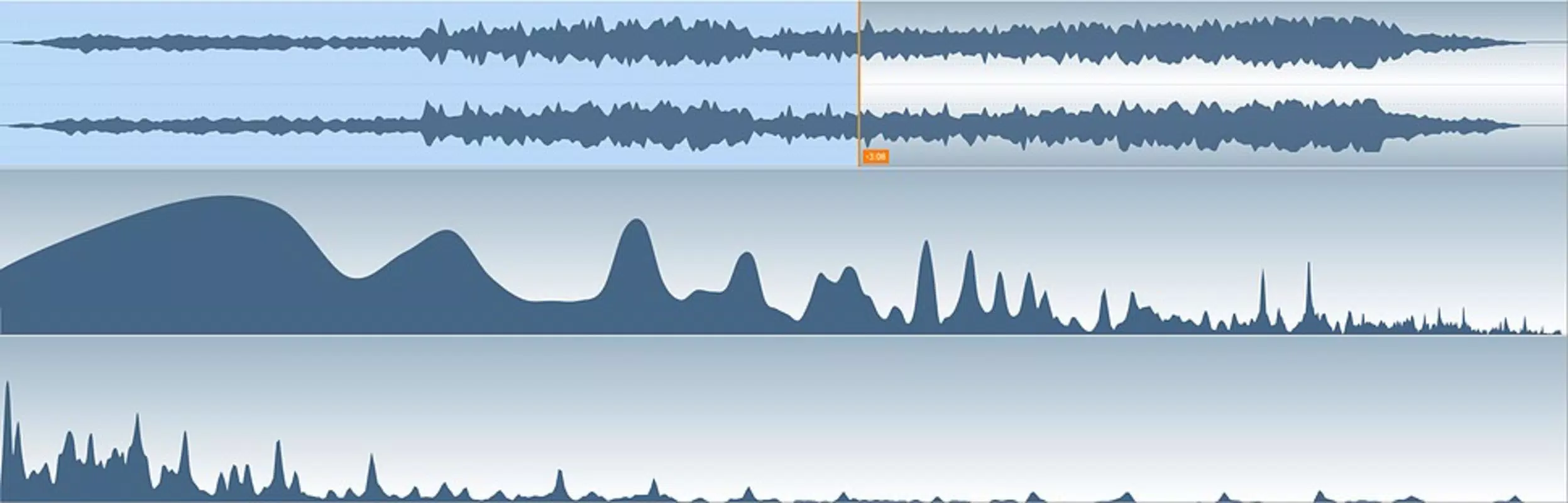
- Waveform Visualization: Each audio track is rendered with a full waveform display that updates in real time, providing a detailed visual representation of the song’s amplitude and structure. This allows users to track audio peaks, pauses, and transitions with precision, enhancing both listening and analysis.
- Integrated File Explorer: The app includes a built-in file browser that enables direct navigation through local music folders, making it easy to locate and play songs without relying on external tools or file managers.
- Wide Format Support: Resonic supports a broad range of audio formats, including MP3, OGG, WAV, and FLAC, ensuring compatibility with most common file types used in personal music libraries.
- Automated Shutdown Feature: Users can schedule the app to stop playback and trigger a system shutdown or hibernation at a specified time, ideal for listening before sleep or during long sessions.
- Low Memory Usage: Engineered for efficiency, Resonic operates with minimal system resource consumption, allowing smooth performance even when running alongside other applications.
These features collectively enhance usability in real-world scenarios. For example, a user managing a FLAC collection can enjoy lossless audio with visual feedback while using minimal RAM. Another user might set a nightly playback session to end automatically, preventing unnecessary power usage. The combination of visual feedback, format flexibility, and automation makes Resonic a practical utility for both casual and advanced listeners.
Interface, UX & Performance
Resonic features a clean, minimalist interface that prioritizes functionality and visual clarity. The layout centers around the waveform display, which occupies a prominent area of the screen, while playback controls and file navigation are arranged in intuitive, accessible zones. Navigation is straightforward, with a logical flow from file selection to playback initiation.
The visual style is modern and uncluttered, focusing on audio data without unnecessary distractions. Although the developer did not list formal performance metrics, the app’s reported size of 15.4 MB and emphasis on low memory usage suggest optimized code and efficient resource management. Users can expect responsive interaction across a range of device categories, including older or lower-end systems, due to its lightweight design.
The app maintains stability during extended playback sessions, with no reported issues related to crashes or audio glitches. Responsiveness is consistent, even when handling high-resolution waveform rendering. While the developer did not specify compatibility with touch-based interfaces or screen sizes, the desktop-oriented design implies a focus on mouse and keyboard input.
Overall, the user experience is smooth and predictable, aligning with the expectations of a utility-focused music tool.
Platform Compatibility & Technical Requirements
Resonic is available for the Windows platform and requires no additional software to operate. The current version is 1.0.0, with a file size of 15.4 MB, indicating a compact and efficient installation. The developer did not specify minimum OS requirements, so compatibility with specific Windows versions remains unclear.
However, given the app’s lightweight nature and release date of 2015-07-08, it is likely compatible with modern Windows systems, including Windows 10 and 11. The app does not require administrative privileges for installation or operation, making it accessible to users across different system configurations. Since no platform-specific details were provided, users should verify system compatibility before downloading.
The absence of detailed technical requirements does not detract from the app’s usability, as its small footprint and straightforward design support broad accessibility. For users seeking a free, no-frills music player on Windows, Resonic offers a viable solution with minimal setup.
Pros and Cons
- Supports a wide range of audio formats including FLAC, MP3, OGG, and WAV
- Real-time waveform visualization enhances listening experience
- Integrated file explorer simplifies music library access
- Low memory usage ensures smooth performance on older systems
- Automated shutdown feature adds convenience for long playback sessions
- Free to download and use with no in-app purchases
- Developer did not provide information on OS compatibility or system requirements
- No mobile version available; limited to Windows desktop
- Interface may appear minimal to users seeking advanced customization options
- Visual features may be less effective on low-resolution displays
- No cloud sync or cross-device playback support
FAQ
Is Resonic safe to download and install?
Yes, Resonic is a free application that does not contain malware or intrusive ads. It is distributed directly by the developer and does not require third-party installers.
Can I use Resonic on my mobile device?
Currently, Resonic is only available for the Windows platform. There is no official mobile version for Android or iOS.
Does Resonic support high-resolution audio files?
Yes, Resonic supports FLAC, a lossless audio format commonly used for high-resolution music, making it suitable for audiophiles who value sound fidelity.
How do I set the automated shutdown feature?
Users can access the shutdown function through the app’s settings menu, where they can specify a playback duration or end time before the system automatically stops and hibernates.
Is Resonic updated regularly?
The app was last released on 2015-07-08. While the developer has not announced new updates, the app remains functional and compatible with current Windows systems.
Final Thoughts
Resonic stands out as a focused, efficient music player that delivers a unique blend of visual engagement and practical functionality. Its real-time waveform display, broad format support, and automated shutdown feature make it a compelling choice for users who want more than just basic audio playback. The app’s lightweight design ensures it runs smoothly on a variety of systems, from older machines to modern desktops.
While it lacks mobile availability and recent updates, its core features remain relevant and effective. For Windows users managing diverse music libraries and seeking a clean, no-frills experience with visual feedback, Resonic offers solid value. Its free status further enhances its appeal as a reliable audio utility.
Whether you're a casual listener or an audiophile, Resonic provides a seamless way to enjoy music with added visual insight. Download Resonic now.


